ReactJS Lab
By Sachin Adi
 AI created a Story on REACT JS
npx create-react-app program1
cd program1
npm start
** program1 is the folder name where all the dependency files will be loaded from internet.
npm start command will start the server and load your react project/program on to the browser automatically.
if it is not loaded automatically then press on http://127.0.0.1:3000 or on http://localhost:3000 by holding CTRL key.
If any error occurs (in red text at termial in VS Code) after exetuting npx command
Then we need to change the Policy settings
In search bar type "Powershell" and open it.
Then paste this command : Set-ExecutionPolicy -Scope CurrentUser -ExecutionPolicy RemoteSigned
then close the VS Code and open it again and type : npx create-react-app {program_name}
Now all the dependency files will download without error.
Step 1: Create a new REACT app
First, you need to create a new React app using create-react-app.
Open your
terminal and run:
npx create-react-app program1
This will set up a new React project in a folder called program1. After the
installation is complete, navigate to the project directory:
cd my-dynamic-app
Step 2: Modify the App.js file
Open the src/App.js file in your favorite code editor and update the code to
include a stateful component using the useState hook. Here’s how you can modify
it:
import React, { useState } from 'react';
import './App.css';
function App( ) {
const [text, setText] = useState('');
const handleChange = (event) => {
setText(event.target.value);
};
return (
<div className="App">
<h1>Dynamic Text Display</h1>
<input
type="text"
value={text}
onChange={handleChange}
placeholder="Type something..."
/>
<p>You typed: {text}</p>
</div>
);
}
export default App;
We need four files. 1.App.js(Parent Component) 2.Header.js(Child Component) 3.Footer.js(Child Component) 4.App.css
1.App.js and App.css are already present. But we need to create Header.js and Footer.js in src folder.
import React from "react";
import Header from "./Header";
import Footer from "./Footer";
import "./App.css";

function App() {
  const appTitle = "Props Demo React Application";
  const footerTagline = "Learning React Props – Crafted for 6th Sem Students";
  const copyright = "© 2026 SMVCE, Raichur. All Rights Reserved.";

  return (
    <div className="app-container">
      <Header title={appTitle} />

      <main>
        <p>This application demonstrates passing data from a parent component to child components using props.</p>
      </main>

      <Footer tagline={footerTagline} copyright={copyright} />
    </div>
  );
}

export default App;
import React from "react";

function Header(props) {
  return (
    <header className="header">
      <h1>{props.title}</h1>
    </header>
  );
}

export default Header;
import React from "react";

function Footer(props) {
  return (
    <footer className="footer">
      <p>{props.tagline}</p>
      <small>{props.copyright}</small>
    </footer>
  );
}

export default Footer;
.app-container {
  text-align: center;
  min-height: 100vh;
  display: flex;
  flex-direction: column;
  justify-content: space-between;
}

.header {
  background-color: #282c34;
  color: white;
  padding: 20px;
}

.footer {
  background-color: #f2f2f2;
  padding: 15px;
  font-size: 14px;
}

main {
  padding: 20px;
}
Output:
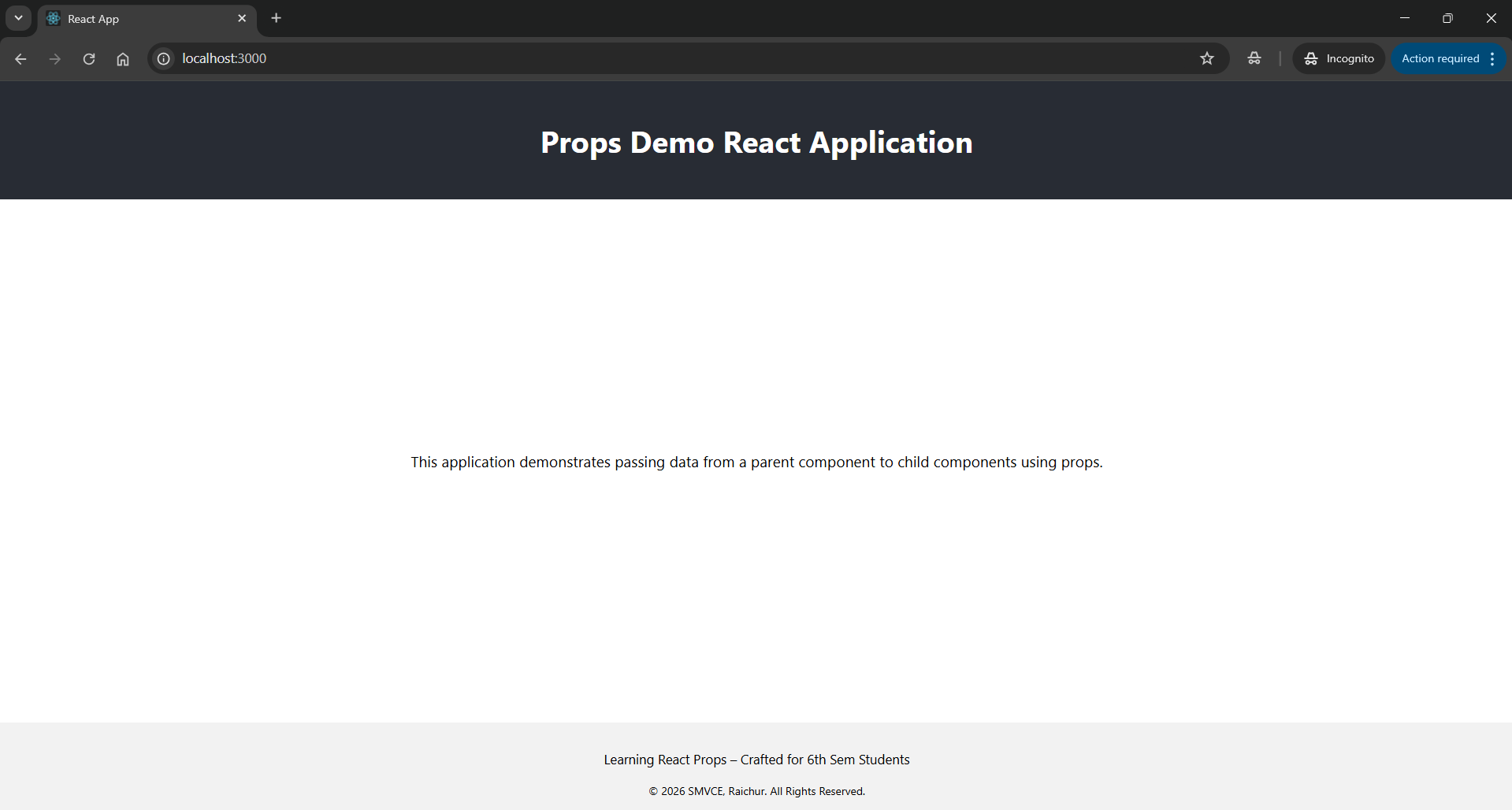
Here we need to edit only 2 files. 1)App.js and 2)App.css
App.js
import React, { useState } from "react";
import "./App.css";

function App() {
  const MIN_VALUE = 0;

  // Counter state
  const [count, setCount] = useState(0);

  // Step state
  const [step, setStep] = useState(1);

  // Increase function
  const increase = () => {
    setCount(count + step);
  };

  // Decrease function (prevent below minimum)
  const decrease = () => {
    if (count - step >= MIN_VALUE) {
      setCount(count - step);
    } else {
      setCount(MIN_VALUE);
    }
  };

  // Reset function
  const reset = () => {
    setCount(0);
  };

  return (
    <div className="container">
      <h1>React Counter Application</h1>

      <div className="counter">{count}</div>

      <div className="controls">
        <button onClick={decrease}>Decrease</button>
        <button onClick={increase}>Increase</button>
        <button onClick={reset}>Reset</button>
      </div>

      <div className="step-control">
        <label>Step Value: </label>
        <input
          type="number"
          value={step}
          min="1"
          onChange={(e) => setStep(Number(e.target.value))}
        />
      </div>
    </div>
  );
}

export default App;
App.css
body {
  font-family: Arial, sans-serif;
  background: linear-gradient(135deg, #4facfe, #00f2fe);
  margin: 0;
  padding: 0;
}

.container {
  text-align: center;
  margin-top: 80px;
  background: white;
  width: 350px;
  padding: 30px;
  border-radius: 12px;
  margin-left: auto;
  margin-right: auto;
  box-shadow: 0 4px 15px rgba(0,0,0,0.2);
}

.counter {
  font-size: 60px;
  font-weight: bold;
  margin: 20px 0;
  color: #333;
}

.controls button {
  margin: 10px;
  padding: 10px 15px;
  font-size: 16px;
  border: none;
  border-radius: 8px;
  cursor: pointer;
  background: #4facfe;
  color: white;
  transition: 0.3s;
}

.controls button:hover {
  background: #007bff;
}

.step-control {
  margin-top: 20px;
}

.step-control input {
  width: 60px;
  padding: 5px;
  font-size: 16px;
  text-align: center;
}
Output:
Here we need to edit only 2 files. 1)App.js and 2)App.css
App.js
import React, { useState } from "react";
import "./App.css";

function ToDoFunction() {
  const [tasks, setTasks] = useState([]);
  const [newTask, setNewTask] = useState("");

  const addTask = () => {
    if (newTask.trim() === "") return;

    const taskObject = {
      id: Date.now(),
      text: newTask,
      completed: false
    };

    setTasks([...tasks, taskObject]);
    setNewTask("");
  };

  const deleteTask = (id) => {
    const updatedTasks = tasks.filter(task => task.id !== id);
    setTasks(updatedTasks);
  };

  const toggleComplete = (id) => {
    const updatedTasks = tasks.map(task =>
      task.id === id ? { ...task, completed: !task.completed } : task
    );
    setTasks(updatedTasks);
  };

  return (
    <div className="container">
      <h2>📝 To-Do List Application</h2>

      <div className="input-container">
        <input
          type="text"
          placeholder="Enter a new task..."
          value={newTask}
          onChange={(e) => setNewTask(e.target.value)}
        />
        <button className="add-btn" onClick={addTask}>
          Add
        </button>
      </div>

      <ul className="task-list">
        {tasks.map(task => (
          <li
            key={task.id}
            className={`task-item ${task.completed ? "completed" : ""}`}
          >
            <span
              className="task-text"
              onClick={() => toggleComplete(task.id)}
            >
              {task.text}
            </span>

            <div>
              <button
                className="complete-btn"
                onClick={() => toggleComplete(task.id)}
              >
                {task.completed ? "Undo" : "Complete"}
              </button>

              <button
                className="delete-btn"
                onClick={() => deleteTask(task.id)}
              >
                Delete
              </button>
            </div>
          </li>
        ))}
      </ul>
    </div>
  );
}

export default ToDoFunction;
 body {
  background-color: #a6e9b7;
  font-family: Arial, Helvetica, sans-serif;
}

.container {
  max-width: 500px;
  margin: 50px auto;
  padding: 25px;
  background-color: white;
  border-radius: 10px;
  box-shadow: 0 5px 15px rgba(0, 0, 0, 0.1);
  text-align: center;
}

h2 {
  margin-bottom: 20px;
  color: #333;
}

.input-container {
  display: flex;
  justify-content: center;
  margin-bottom: 20px;
}

input {
  width: 70%;
  padding: 10px;
  border-radius: 5px;
  border: 1px solid #ccc;
  font-size: 14px;
}

.add-btn {
  padding: 10px 15px;
  margin-left: 5px;
  border: none;
  border-radius: 5px;
  background-color: #007bff;
  color: white;
  cursor: pointer;
  transition: 0.3s;
}

.add-btn:hover {
  background-color: #0056b3;
}

.task-list {
  list-style-type: none;
  padding: 0;
}

.task-item {
  display: flex;
  justify-content: space-between;
  align-items: center;
  padding: 10px;
  margin-bottom: 10px;
  border-radius: 5px;
  background-color: #f8f9fa;
  transition: 0.3s;
}

.task-item.completed {
  background-color: #d4edda;
  text-decoration: line-through;
}

.task-text {
  cursor: pointer;
  flex: 1;
  text-align: left;
}

.complete-btn {
  margin-right: 5px;
  padding: 6px 10px;
  border: none;
  border-radius: 5px;
  background-color: #28a745;
  color: white;
  cursor: pointer;
  transition: 0.3s;
}

.complete-btn:hover {
  background-color: #1e7e34;
}

.delete-btn {
  padding: 6px 10px;
  border: none;
  border-radius: 5px;
  background-color: #dc3545;
  color: white;
  cursor: pointer;
  transition: 0.3s;
}

.delete-btn:hover {
  background-color: #a71d2a;
}
Output:
Here we need to edit 4 files. 1)App.js , 2)App.css . Create a folder named components inside src folder and inside this folder create 3)FigureList.js and 4)BasicFigure.js
1) App.js
import React from "react";
import FigureList from "./components/FigureList";
import "./App.css";

function App() {
  return (
    <div className="App">
      <h1 className="title">Figure Gallery App</h1>
      <FigureList />
{/* Footer */}
      <footer className="footer">
        <p>© 2026 SMVCE, Raichur | All Rights Reserved</p>
      </footer>
    </div>
  );
}

export default App;
2) App.css
.App {
  text-align: center;
  padding: 20px;
  background-color: #f4f6f8;
  min-height: 100vh;
}

.title {
  color: #333;
  margin-bottom: 20px;
  font-size: 28px;
}
.input-container {
  margin-bottom: 20px;
}

.input-container input {
  padding: 8px;
  margin: 5px;
  width: 200px;
}

.input-container button {
  padding: 8px 15px;
  background-color: #007bff;
  color: white;
  border: none;
  cursor: pointer;
}

.input-container button:hover {
  background-color: #0056b3;
}

/* Grid Layout */
.grid {
  display: grid;
  grid-template-columns: repeat(auto-fit, minmax(220px, 1fr));
  gap: 20px;
}

/* Card Styling */
.card {
  background: white;
  border-radius: 10px;
  overflow: hidden;
  box-shadow: 0 4px 8px rgba(0,0,0,0.1);
  transition: transform 0.3s, box-shadow 0.3s;
}

/* Hover Animation */
.card:hover {
  transform: scale(1.05);
  box-shadow: 0 8px 16px rgba(0,0,0,0.2);
}

.card img {
  width: 100%;
  height: 150px;
  object-fit: contain;
  padding-top: 10px;
}

.card-body {
  padding: 10px;
}

.card-body button {
  margin-top: 10px;
  padding: 5px 10px;
  background-color: red;
  color: white;
  border: none;
  cursor: pointer;
}

.card-body button:hover {
  background-color: darkred;
}
.footer {
  margin-top: 30px;
  padding: 15px;
  background-color: #333;
  color: white;
  text-align: center;
  font-size: 14px;
  border-radius: 10px;
}
3) FigureList.js
import React, { useState } from "react";
import BasicFigure from "./BasicFigure";

function FigureList() {
  const [figures, setFigures] = useState([
    {
      image: "https://sachinadi.neocities.org/photo/college1.jpg",
      caption: "college"
    },
    {
      image: "https://sachinadi.neocities.org/photo/college2.jpg",
      caption: "Open Stage"
    }
  ]);

  const [image, setImage] = useState("");
  const [caption, setCaption] = useState("");

  const addFigure = () => {
    if (image === "" || caption === "") return;

    setFigures([...figures, { image, caption }]);
    setImage("");
    setCaption("");
  };

  const removeFigure = (index) => {
    const updated = figures.filter((_, i) => i !== index);
    setFigures(updated);
  };

  return (
    <div>
      {/* Input Section */}
      <div className="input-container">
        <input
          type="text"
          placeholder="Enter Image URL"
          value={image}
          onChange={(e) => setImage(e.target.value)}
        />
        <input
          type="text"
          placeholder="Enter Caption"
          value={caption}
          onChange={(e) => setCaption(e.target.value)}
        />
        <button onClick={addFigure}>Add</button>
      </div>

      {/* Grid Section */}
      <div className="grid">
        {figures.map((fig, index) => (
          <BasicFigure
            key={index}
            image={fig.image}
            caption={fig.caption}
            onRemove={() => removeFigure(index)}
          />
        ))}
      </div>
    </div>
  );
}

export default FigureList;
4) BasicFigure.js
import React from "react";
function BasicFigure({ image, caption, onRemove }) {
  return (
    <div className="card">
      <img src={image} alt={caption} />
      <div className="card-body">
        <p>{caption}</p>
        <button onClick={onRemove}>Remove</button>
      </div>
    </div>
  );
}

export default BasicFigure;
Output:
Images Links for Program 5
Here we need to edit only 2 files. 1)App.js and 2)App.css
App.js
import React, { useState } from "react";
import "./App.css";

function App() {
  const [formData, setFormData] = useState({
    name: "",
    email: "",
    password: ""
  });

  const [errors, setErrors] = useState({});
  const [showPassword, setShowPassword] = useState(false);

  // Email validation regex
  const validateEmail = (email) => {
    return /^[^\s@]+@[^\s@]+\.[^\s@]+$/.test(email);
  };

  // Sanitization (basic)
  const sanitizeInput = (value) => {
    return value.replace(/</g, "").replace(/>/g, "").trim();
  };

  // Handle input change
  const handleChange = (e) => {
    const { name, value } = e.target;

    setFormData({
      ...formData,
      [name]: sanitizeInput(value)
    });
  };

  // Form validation
  const validateForm = () => {
    let newErrors = {};

    if (!formData.name) {
      newErrors.name = "Name is required";
    }

    if (!formData.email) {
      newErrors.email = "Email is required";
    } else if (!validateEmail(formData.email)) {
      newErrors.email = "Invalid email format";
    }

    if (!formData.password) {
      newErrors.password = "Password is required";
    } else if (formData.password.length < 6) {
      newErrors.password = "Password must be at least 6 characters";
    }

    setErrors(newErrors);

    return Object.keys(newErrors).length === 0;
  };

  // Handle submit
  const handleSubmit = (e) => {
    e.preventDefault();

    if (validateForm()) {
      alert("Form Submitted Successfully!");
      console.log("User Data:", formData);
    }
  };

  return (
    <div className="container">
      <h2>User Registration Form</h2>

      <form onSubmit={handleSubmit}>
        {/* Name */}
        <div className="form-group">
          <label>Name</label>
          <input
            type="text"
            name="name"
            value={formData.name}
            onChange={handleChange}
            className={errors.name ? "error-input" : ""}
          />
          {errors.name && <p className="error">{errors.name}</p>}
        </div>

        {/* Email */}
        <div className="form-group">
          <label>Email</label>
          <input
            type="text"
            name="email"
            value={formData.email}
            onChange={handleChange}
            className={errors.email ? "error-input" : ""}
          />
          {errors.email && <p className="error">{errors.email}</p>}
        </div>

        {/* Password */}
        <div className="form-group">
          <label>Password</label>
          <div className="password-box">
            <input
              type={showPassword ? "text" : "password"}
              name="password"
              value={formData.password}
              onChange={handleChange}
              className={errors.password ? "error-input" : ""}
            />
            <button
              type="button"
              onClick={() => setShowPassword(!showPassword)}
            >
              {showPassword ? "Hide" : "Show"}
            </button>
          </div>
          {errors.password && <p className="error">{errors.password}</p>}
        </div>

        {/* Submit */}
        <button type="submit" className="submit-btn">
          Submit
        </button>
      </form>
    </div>
  );
}

export default App;
  body {
  font-family: Arial, sans-serif;
  background: #f4f4f4;
       }

.container {
  width: 350px;
  margin: 50px auto;
  background: grey;
  padding: 30px;
  border-radius: 10px;
  box-shadow: 0 0 10px #ccc;
           }

h2 {
  text-align: center;
   }

.form-group {
  margin-bottom: 15px;
            }

input {
  width: 100%;
  padding: 8px;
  margin-top: 5px;
  border: 1px solid #ccc;
  border-radius: 5px;
      }

/* Red border for errors */
.error-input {
  border: 2px solid red;
             }

.error {
  color: red;
  font-size: 12px;
  margin-top: 5px;
       }

.password-box {
  display: flex;
  gap: 5px;
            }

.password-box input {
  flex: 1;
          }

button {
  padding: 8px;
  cursor: pointer;
  border-radius: 5px;
      }

.submit-btn {
  width: 100%;
  background: green;
  color: white;
  border: none;
  border-radius: 5px;
          }

.submit-btn:hover {
  background: darkgreen;
                }
Output:
Here we need to edit 4 files. 1)App.js , 2)App.css . Create a folder named components inside src folder and inside this folder create files : 3)ProfileCard.js and 4)ProfileCard.css
1) App.js
import React from "react";
import ProfileCard from "./components/ProfileCard";
import "./App.css";

function App() {
  return (
    <div className="app">
      <ProfileCard
        name="Dr. A.P.J. Abdul Kalam"
        bio="Indian aerospace scientist and statesman who served as the President of India from 2002 to 2007."
        image="https://sachinadi.neocities.org/pic/apj.jpg"
        bgColor="#a1c4fd"
      />

      <ProfileCard
        name="Dr. Raj Reddy"
        bio="He is an Indian-born American Computer Scientist and early pioneers of Artificial Intelligence and served in Stanford and
        Carnegie Mellon University for over 50 years."
        image="https://sachinadi.neocities.org/pic/rajreddy.jpg"
        bgColor="#fbc2eb"
      />
    </div>
  );
}

export default App;
.app {
  min-height: 100vh;
  display: flex;
  justify-content: center;
  align-items: center;
  gap: 30px;
  flex-wrap: wrap;
  background: linear-gradient(to right, #e0c3fc, #8ec5fc);
  padding: 20px;
}
import React, { useState } from "react";
import "./ProfileCard.css";

const ProfileCard = ({ name, bio, image, bgColor }) => {
  const [color, setColor] = useState(bgColor);

  // Change background on click (dynamic behavior)
  const changeColor = () => {
    const colors = ["#ff9a9e", "#a18cd1", "#fbc2eb", "#84fab0", "#f6d365"];
    const randomColor = colors[Math.floor(Math.random() * colors.length)];
    setColor(randomColor);
  };

  return (
    <div
      className="card"
      style={{ backgroundColor: color }} // Inline styling
      onClick={changeColor}
    >
      <img src={image} alt="profile" className="profile-img" />
      <h2>{name}</h2>
      <p>{bio}</p>
    </div>
  );
};

export default ProfileCard;
.card {
  width: 280px;
  padding: 20px;
  border-radius: 20px;
  text-align: center;
  color: #333;
  transition: transform 0.3s ease, box-shadow 0.3s ease;
  cursor: pointer;
}

/* Hover Effect */
.card:hover {
  transform: translateY(-10px) scale(1.03);
  box-shadow: 0 10px 25px rgba(0, 0, 0, 0.2);
}

/* Profile Image */
.profile-img {
  width: 120px;
  height: 120px;
  border-radius: 50%; /* Circle image */
  object-fit: cover;
  margin-bottom: 15px;
  border: 3px solid white;
}

/* Text Styling */
.card h2 {
  margin: 10px 0;
  font-size: 22px;
}

.card p {
  font-size: 14px;
  line-height: 1.5;
}

/* Responsive Design */
@media (max-width: 600px) {
  .card {
    width: 90%;
  }
}
Output:
Here we need to edit 2 files. 1)App.js , 2)App.css .
1) App.js
import React, { useState } from "react";
import "./App.css";

function App() {
  const [tasks, setTasks] = useState([]);
  const [filter, setFilter] = useState("all");

  const [formData, setFormData] = useState({
    name: "",
    date: "",
    description: ""
  });

  // Handle Input Change
  const handleChange = (e) => {
    setFormData({
      ...formData,
      [e.target.name]: e.target.value
    });
  };

  // Add Task
  const handleSubmit = (e) => {
    e.preventDefault();

    if (!formData.name || !formData.date) {
      alert("Task name and due date are required!");
      return;
    }

    const newTask = {
      id: Date.now(),
      ...formData,
      completed: false
    };

    setTasks([...tasks, newTask]);

    setFormData({
      name: "",
      date: "",
      description: ""
    });
  };

  // Toggle Completion
  const toggleComplete = (id) => {
    const updatedTasks = tasks.map((task) =>
      task.id === id ? { ...task, completed: !task.completed } : task
    );
    setTasks(updatedTasks);
  };

  // Filter Tasks
  const filteredTasks = tasks.filter((task) => {
    if (filter === "completed") return task.completed;
    if (filter === "pending") return !task.completed;
    return true;
  });

  return (
    <div className="container">
      <h1>Reminder App</h1>

      {/* Form */}
      <form onSubmit={handleSubmit}>
        <input
          type="text"
          name="name"
          placeholder="Task Name"
          value={formData.name}
          onChange={handleChange}
        />

        <input
          type="date"
          name="date"
          value={formData.date}
          onChange={handleChange}
        />

        <textarea
          name="description"
          placeholder="Description (optional)"
          value={formData.description}
          onChange={handleChange}
        />

        <button type="submit">Add Task</button>
      </form>

      {/* Filters */}
      <div className="filters">
        <button onClick={() => setFilter("all")}>All</button>
        <button onClick={() => setFilter("completed")}>Completed</button>
        <button onClick={() => setFilter("pending")}>Pending</button>
      </div>

      {/* Task List */}
      <ul>
        {filteredTasks.length === 0 ? (
          <p>No tasks found</p>
        ) : (
          filteredTasks.map((task) => (
            <li key={task.id} className={task.completed ? "done" : ""}>
              <h3>{task.name}</h3>
              <p><strong>Due:</strong> {task.date}</p>
              {task.description && <p>{task.description}</p>}

              <button onClick={() => toggleComplete(task.id)}>
                {task.completed ? "Undo" : "Complete"}
              </button>
            </li>
          ))
        )}
      </ul>
    </div>
  );
}

export default App;
  /* Container */
.container {
  max-width: 600px;
  margin: auto;
  text-align: center;
  font-family: Arial, sans-serif;
  background-color: #f4f7fb;
  padding: 20px;
  border-radius: 10px;
}

/* Title */
h1 {
  color: #4a90e2;
}

/* Inputs */
form input,
form textarea {
  display: block;
  width: 100%;
  margin: 10px 0;
  padding: 8px;
  border: 1px solid #ccc;
  border-radius: 6px;
  transition: 0.2s;
}

form input:focus,
form textarea:focus {
  border-color: #4a90e2;
  outline: none;
}

/* Add Button */
form button {
  padding: 8px 12px;
  margin-top: 10px;
  background-color: #4a90e2;
  color: white;
  border: none;
  border-radius: 6px;
  cursor: pointer;
}

form button:hover {
  background-color: #357abd;
}

/* Filters */
.filters button {
  padding: 6px 10px;
  margin: 5px;
  border: none;
  border-radius: 5px;
  cursor: pointer;
  background-color: #e0e0e0;
}

.filters button:hover {
  background-color: #4a90e2;
  color: white;
}

/* Task List */
ul {
  list-style: none;
  padding: 0;
}

/* Task Item */
li {
  border: 1px solid #ddd;
  padding: 10px;
  margin: 10px 0;
  border-radius: 6px;
  background-color: #ffffff;
  text-align: left;
  transition: 0.2s;
}

li:hover {
  background-color: #f1f7ff;
}

/* Completed Task */
.done {
  background-color: #d4edda;
  text-decoration: line-through;
}

/* Task Button */
li button {
  padding: 5px 8px;
  border: none;
  border-radius: 5px;
  background-color: #28a745;
  color: white;
  cursor: pointer;
}

li button:hover {
  background-color: #218838;
}
Output:
Output:
Here we need to edit 7 files. 1)index.js , 2)App.js , 3)App.css. Next create a folder named "components" in src folder and inside this folder create files : 4)Navbar.js 5)Home.js 6)About.js 7)Contact.js
But Before editing these files run "npm install react-router-dom" command in terminal after "npx create-react-app {prog_name}"
import React from "react";
import ReactDOM from "react-dom/client";
import App from "./App";

const root = ReactDOM.createRoot(document.getElementById("root"));
root.render(<App />);
App.js
import React from "react";
import { BrowserRouter, Routes, Route } from "react-router-dom";
import Navbar from "./components/Navbar";
import Home from "./components/Home";
import About from "./components/About";
import Contact from "./components/Contact";
import "./App.css";

function App() {
  return (
    <BrowserRouter>
      <Navbar />

      <div className="container">
        <Routes>
          <Route path="/" element={<Home />} />
          <Route path="/about" element={<About />} />
          <Route path="/contact" element={<Contact />} />
        </Routes>
      </div>
    </BrowserRouter>
  );
}

export default App;
App.css
body {
  margin: 0;
  font-family: Arial, sans-serif;
  background: #f4f6f8;
}

/* Navbar */
.navbar {
  display: flex;
  justify-content: space-between;
  align-items: center;
  background: #4a90e2;
  padding: 15px 30px;
}

.logo {
  color: white;
  margin: 0;
}

.links a {
  margin: 0 10px;
  text-decoration: none;
  color: white;
  font-weight: bold;
  padding: 6px 10px;
  border-radius: 5px;
  transition: 0.3s;
}

/* Hover */
.links a:hover {
  background: white;
  color: #4a90e2;
}

/* Active Link */
.links a.active {
  background: white;
  color: #4a90e2;
}

/* Page Content */
.container {
  padding: 30px;
}

.page {
  background: white;
  padding: 20px;
  border-radius: 10px;
  box-shadow: 0 2px 8px rgba(0,0,0,0.1);
}
Navbar.js
import React from "react";
import { NavLink } from "react-router-dom";

function Navbar() {
  return (
    <nav className="navbar">
      <h2 className="logo">MyApp</h2>

      <div className="links">
        <NavLink to="/" className={({ isActive }) => isActive ? "active" : ""}>
          Home
        </NavLink>

        <NavLink to="/about" className={({ isActive }) => isActive ? "active" : ""}>
          About
        </NavLink>

        <NavLink to="/contact" className={({ isActive }) => isActive ? "active" : ""}>
          Contact
        </NavLink>
      </div>
    </nav>
  );
}

export default Navbar;
Home.js
import React from "react";

function Home() {
  return (
    <div className="page">
      <h1>Home Page</h1>
      <p>Welcome to our website! This is the home page.</p>
    </div>
  );
}

export default Home;
About.js
import React from "react";

function About() {
  return (
    <div className="page">
      <h1>About Page</h1>
      <p>This page contains information about our application.</p>
    </div>
  );
}

export default About;
Contact.js
import React from "react";

function Contact() {
  return (
    <div className="page">
      <h1>Contact Page</h1>
      <p>You can contact us at: contact@example.com</p>
    </div>
  );
}

export default Contact;
Output:
Here we need to edit 4 files. 1)App.js , 2)App.css. Next create a folder named "components" in src folder and inside this folder create a file : 3) UserList.js now in public folder create file :4) data.json
App.js
import React from "react";
import UserList from "./components/UserList";
import "./App.css";

class App extends React.Component {
  render() {
    return (
      <div className="container">
        <h1> User Data Dashboard</h1>
        <UserList />
      </div>
    );
  }
}

export default App;
App.css
body {
  font-family: Arial, sans-serif;
  background: #f4f6f9;
}

.container {
  text-align: center;
  padding: 20px;
}

.card {
  background: white;
  padding: 20px;
  margin: auto;
  width: 80%;
  border-radius: 10px;
  box-shadow: 0 4px 10px rgba(0,0,0,0.1);
}

.controls {
  margin-bottom: 15px;
}

input {
  padding: 8px;
  width: 250px;
  margin-right: 10px;
}

button {
  padding: 8px 12px;
  background: #007bff;
  color: white;
  border: none;
  cursor: pointer;
}

button:hover {
  background: #0056b3;
}

table {
  width: 100%;
  border-collapse: collapse;
}

th {
  background: #007bff;
  color: white;
  padding: 10px;
}

td {
  padding: 8px;
  border-bottom: 1px solid #ddd;
}

.error {
  color: red;
  font-weight: bold;
}
UserList.js
import React, { Component } from "react";

class UserList extends Component {
  constructor(props) {
    super(props);

    this.state = {
      users: [],
      filteredUsers: [],
      search: "",
      loading: false,
      error: null
    };
  }

  // 1. Fetch data when component mounts
  componentDidMount() {
    this.fetchUsers();
  }

  //  2. Detect state changes (search input)
  componentDidUpdate(prevProps, prevState) {
    if (prevState.search !== this.state.search) {
      this.filterUsers();
    }
  }

  //  API Call
  fetchUsers = async () => {
    this.setState({ loading: true, error: null });

    try {
      const response = await fetch(
        "/data.json"
      );

      if (!response.ok) {
        throw new Error("Failed to fetch data");
      }

      const data = await response.json();

      this.setState({
        users: data,
        filteredUsers: data,
        loading: false
      });
    } catch (error) {
      this.setState({
        error: error.message,
        loading: false
      });
    }
  };

  //  Filter Logic
  filterUsers = () => {
    const { users, search } = this.state;

    const filtered = users.filter((user) =>
      user.name.toLowerCase().includes(search.toLowerCase())
    );

    this.setState({ filteredUsers: filtered });
  };

  //  Handle Input Change
  handleSearch = (e) => {
    this.setState({ search: e.target.value });
  };

  //  Refresh Data
  handleRefresh = () => {
    this.fetchUsers();
  };

  render() {
    const { filteredUsers, loading, error, search } = this.state;

    return (
      <div className="card">
        <div className="controls">
          <input
            type="text"
            placeholder="Search users..."
            value={search}
            onChange={this.handleSearch}
          />

          <button onClick={this.handleRefresh}> Refresh</button>
        </div>

        {loading && <p>Loading data...</p>}

        {error && <p className="error"> error}</p>}

        {!loading && !error && filteredUsers.length === 0 && (
          <p>No users found</p>
        )}

        {!loading && !error && filteredUsers.length > 0 && (
          <table>
            <thead>
              <tr>
                <th>Name</th>
                <th>Email</th>
                <th>City</th>
              </tr>
            </thead>

            <tbody>
              {filteredUsers.map((user) => (
                <tr key={user.id}>
                  <td>{user.name}</td>
                  <td>{user.email}</td>
                  <td>{user.city}</td>
                </tr>
              ))}
            </tbody>
          </table>
        )}
      </div>
    );
  }
}

export default UserList;
data.json
[
  {
    "id": 1,
    "name": "Umesh",
    "email": "umesh@gmail.com",
    "city": "Chennai"
  },
  {
    "id": 2,
    "name": "Rahul",
    "email": "rahul@gmail.com",
    "city": "Bangalore"
  },
  {
    "id": 3,
    "name": "Priya",
    "email": "priya@gmail.com",
    "city": "Hyderabad"
  }
]
Output: